


Hidden in the February 2016 release ( 12.1.2.6 ) of the Oracle Database Appliance (ODA) new Oracle VM feature is enabled, called Driver Domains. Driver Domains are a new way to manage storage on the ODA, and show significance disk performance improvements for guest virtual machines.For an idea on how much of an improvement, check out my post at the Mythics BLOG
In the original I/O model, all virtual disk images ( .img files) live in a shared repo on an ACFS file system in oda_base. The repository is then NFS mounted back to Dom0, and then shared to the virtual machine. This NFS mount is where much of the performance congestion comes from. This congestion could cause performance issues with I/O inside of VMs.
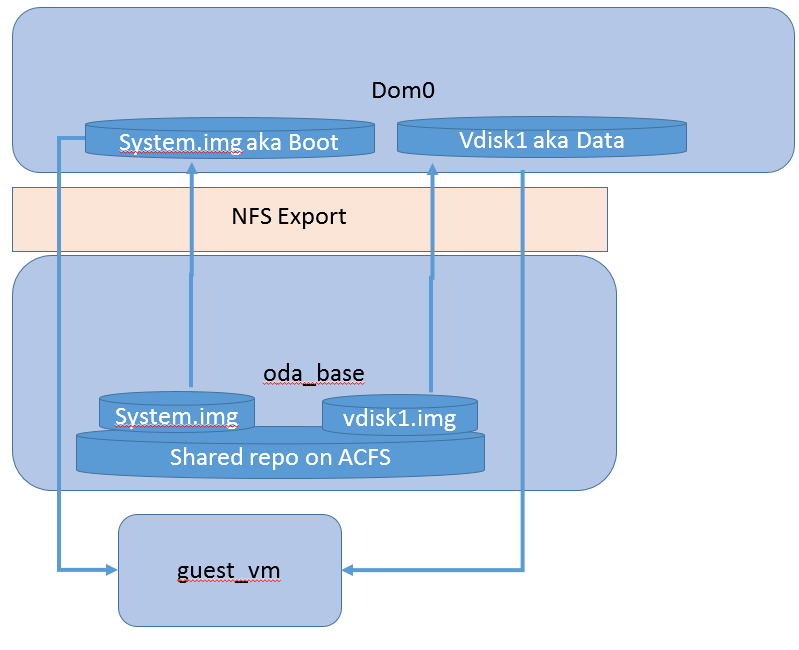
What is unique about Driver Domains, is that in Oracle VM there is the ability to bypass the second trip through NFS, by configuring the virtual disk to access oda-base using a Driver Domain enables the vdisk.img file to be directly presented to the VM. This eliminates the trip through NFS, improving performance.
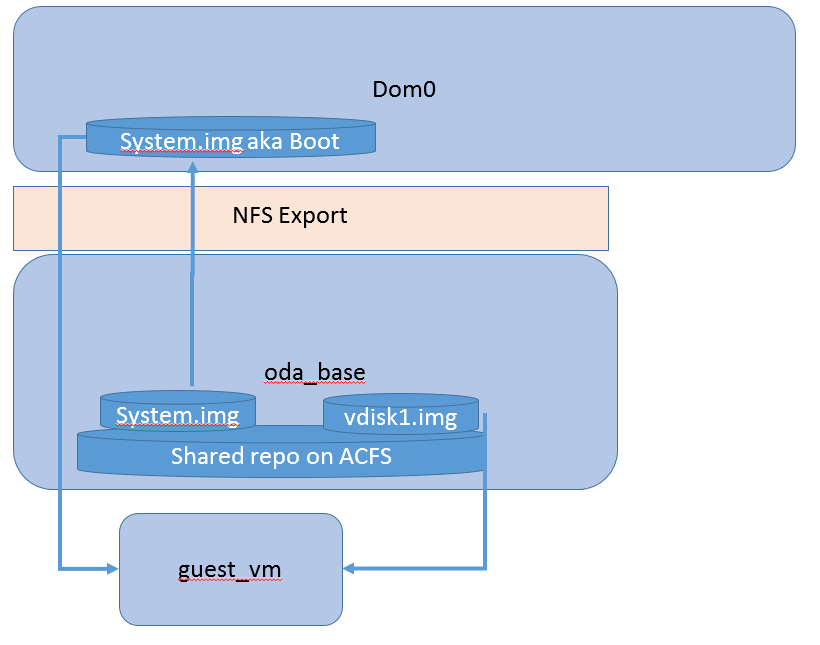
As with most things ODS, setting this up is very simple. You simply clone from a template to a new VM with the –driverdomain option. If you have an existing VM, you will need to first clone the VM to a template, and then use that to make the Driver Domain VM.
root@x5db1 snaps]# oakcli clone vm test -vmtemplate test -repo repo0 -node 1 –driverdomain
Cloned VM : test
Next we can add a new data disk, so we need to create it first;
[root@x5db1 snaps]# oakcli create vdisk ddspeed -repo repo0 -size 5G -type local
Created Vdisk : oakvdk_ddspeed
Next we mount it to the VM
[root@x5db1 snaps]# oakcli modify vm test -attachvdisk ddspeed
Configured VM : test. Changes will take effect on next restart of VM.
Now start the VM, and on the new disk, you can then create a volume group, or simply format a filesystem on it. Use this for the “performance” disk in the VM.
Hopefully this gets you started with Driver Domains on the ODA, any questions drop me a note in the comments.

Thanks for a very interesting post Erik!
Can I just clarify: with DD it’s as if the vDisk attached to the VM is attached straight to the NFS server in ODA Base (i.e. the VM itself is kind of the NFS client, not the Dom0)? This doesn’t seem to apply to the boot disk though – the guest OS has to be up first? As it’s still on the shared repo it sounds like you should still be able to relocate VMs between nodes.
I’m looking forward to trying it myself but have you any idea of performance improvement yet? (sounds like it might be comparable to mounting an NFS share directly in the guest)
Thanks!
Simon
Yes, the “boot” disk still goes though the old path, but I have seen some performance improvement there too. A NFS mount is fine too, but not all use cases work well with an NFS share, sometime you just need the block device.
Hi Erik,
Good info. Does Live Migration still work in such setup?
-Artem
No, Live Migration will not work, due to the direct path to storage. But, a regular fail-over will work just fine.
Hi there
This was good thank-you. I’m very new to the VM stuff so pardon the ignorant question, but is a vdisk the only way to add storage to a VM? I’m creating a VM for deploying EM13c and used a OL7 template. I assume creating a vdisk is the only way to add storage to deploy the app on. Is that correct?
I already have a VM. I’m missing some magic sauce. How do I “clone the VM *to* a template”?
Keith,
The docs are here; http://docs.oracle.com/cd/E75550_01/doc.121/e77147/GUID-0956E41E-72CC-44D0-841A-57D498EF2FBE.htm#CMTAR-GUID-0519D1B0-2664-406F-A744-207BA8BB7A1D
But basically, just clone the VM. Personally I make my own templates using OVM,and then manually extract the files to make a .ova file. Look for an upcoming book on OVM that will have all the details.
Erik
Hi,
I updated my ODA to the last version (12.1.2.11), changed the vms to a driver domain and the performance of the database is more slow than before.
Can be affected the database performance after change the VM to a Driver domain?
Thanks
Frank
It might, if both the VM and database IOPS exceed the performance of the ODA. I see this most often with the X5 model, when ADO is not used on the database side to enable database tierign between the FLASH and DATA diskgroups.