


If you are not familiar with the Oracle Management Cloud technology, please take a look at my summary here: HOW DO YOU MANAGE YOUR CLOUD? STRATEGIES FOR MULTI-VENDOR PUBLIC, PRIVATE & HYBRID CLOUD MANAGEMENT
This BLOG will go over how perform a basic install the Cloud Agent on a host.
Before installing the agent , there are a few house keeping chores needed. First you will need to install the prerequisite packages , you can find that here. On most Oracle Linux systems, you will only need the 32 bit libaio package. This is installed using the command “yum –y install libaio.i686”
Next, it is likely you will need to edit your /etc/host file. This is because OMC is using the Fully Qualified Domain Name (FQDN) for the host, and that must be the first entry in the /etc/hosts file for the host.
So, if your host is db122a and the FQDN is db122a.m57.local the entry in /etc/hosts should have the FQDN as the first name in the line for the host. The following sample is correct

And this following example is incorrect, and if used will cause the install to fail.

The next step is to download the installer from the OMC website. This is accessed from the Oracle Management Cloud Agents Menu by by first clicking on the arrow/circle icon and then the Agents option.

Next, from the Oracle Management Cloud Agents Menu select the Download Tab on the left. Finally select the download icon.
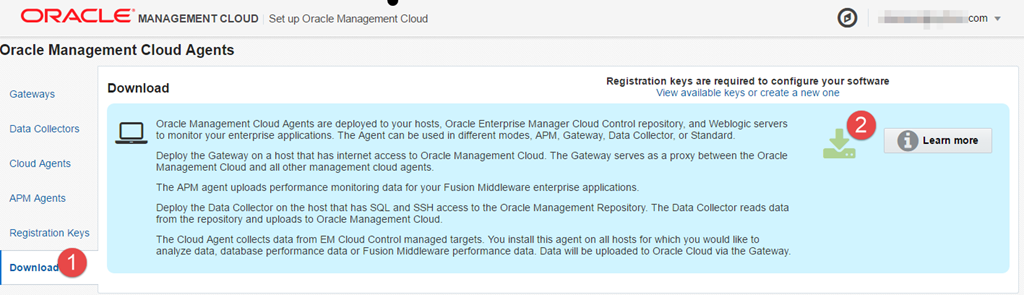
This will download the AgentInstall.zip file. Copy this file to the server you want to install OMC on and extract it into a directory. Do NOT do this as root, personally I use the oracle user and extract it into /home/oracle/omc
Once extracted you should have three files, AgentInstall.bat ( for Windows hosts), AgentInstall.sh and a README file.
The next step is to install an agent. Since this is a simple install a gateway host will not be used. The Gateway hosts is an optional role, that consolidates all OMC trafiic from your local network through a single host. This is helpful when special firewall rules are required.
Next, we need the check what the hostname command returns. If it does not return the FQDN, we will need an extra parameter on the installer. To check simply run “hostname”
On this host the FQDN is returned, not no special action is required.
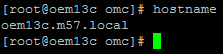
But on this host ( The one we are installing on) the FQDN is NOT returned, so and additional parameter ORACLE_HOSTNAME will be added to the install command line.

Next, let’s install the Cloud Agent Software. As this is a simple installation, not gateway will be used and each host will communicate directly with the OMC server in the Oracle Cloud. The AgentInstall.sh command is used, with the AGENT_TYPE being cloud_agent. The AGENT_REGISTRATION_KEY comes from the Registration Tab in the Oracle Management Cloud Agents menu.

The AGENT_BASE_DIR is where the agent will live, I put it into /u01/omc/infra. The last required parameter is AGENT_PORT, which is the TCP port that the Agent will listen on. I used 1302 for the example. Make sure you use a unique port on the server, ports like 1521 and 80 should not be used.
If the hostname does not return a FQDN, you WILL BE REQUIRED to add the ORACLE_HOSTNAME parameter, with the FQDN of the host.
When all done and said with the command should look similar to this.
./AgentInstall.sh AGENT_TYPE=cloud_agent AGENT_REGISTRATION_KEY=R5o50UC8***************** AGENT_BASE_DIR=/u01/omc/infra AGENT_PORT=1302 ORACLE_HOSTNAME=db122b.m57.local
When running the command it will automatically download the latest version of the agent software, install the software, register the agent and secure the communication between the agent and the cloud. The following is an example;
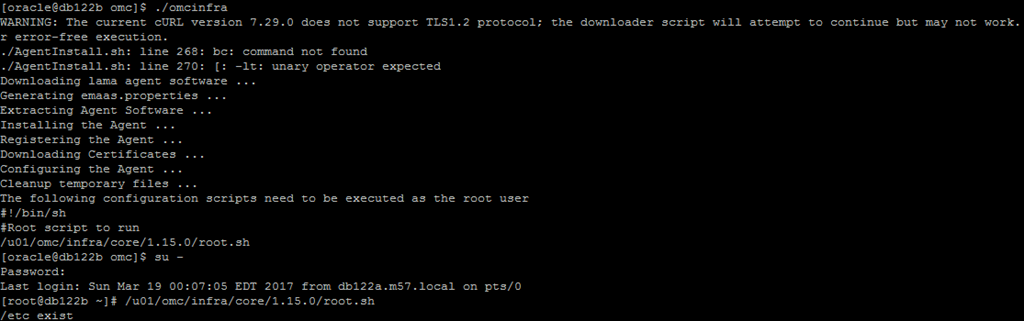
NOTE , while cURL 7.49.1 is required for TLS 1.2 support , for now cURL 7.29 appears to work.
Once installed, the Cloud Agent will show up in the list of installed agents in the Oracle Management Cloud Agents menu under the Cloud Agents tab;
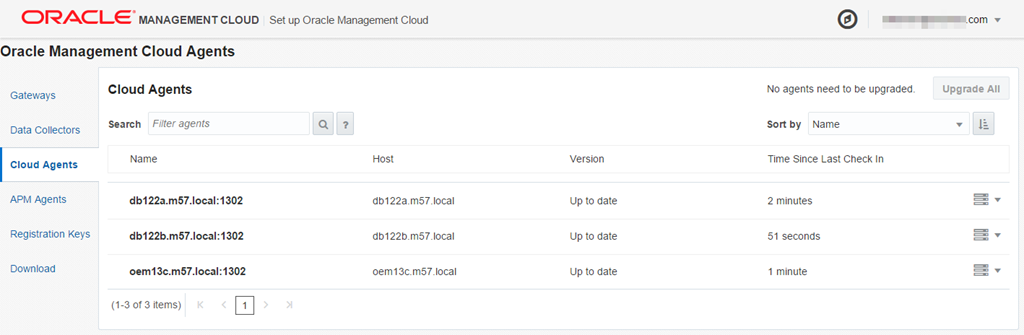
If you click on the agent, you will see the details for the agent, including the version, Installation date, Registration Key and more.

Do you want to learn more about Oracle Management Cloud. At Collaborate 2017, there is a Hand on Lab called the “Cloud Experience” that is free for attendees on Wednesday 4/5/2017. In the HOL, we will install the Oracle Management Cloud Application Performance Management Cloud Service and you can learn how OMC can help you manage diverse complex clouds.
Also, please follow this BLOG for more information in the near future about OMC.
There are a ton more options that the cloud agent preforms for the Oracle Management Cloud, check out the other Oracle Management Blogs in the IOUG Cloud SIG 2017 Collaborate blog roll;
- How do you manage your cloud? Strategies for multi-vendor public, private, and hybrid cloud management
- What is the Oracle Management Cloud?
- Cloud Agent Install
- Deploying the Oracle Management Cloud Application Performance Monitoring agent on WebLogic
- Managing the Oracle Cloud Agent
- Setup Entities in Log Analytics
- Types of Oracle APM Agents
- Installing the Oracle APM Java Agent on WebLogic
- Logging into Oracle APM Cloud Service for the first time
- Overview of Oracle APM Cloud Service features
- Alerting in Oracle Application Performance (APM)

Hi,
I’m trying to install the agent in an Oracle Linux 6.7 Server with an Oracle 11.2.0.4 Database.
I have the curl version error when I try to deploy the agent. How do you solve this issue without upgrading the OS to the latest 6 release?
Regards
You should still be able to download the agent, even with the error. You can also stage the binaries on a local share, and avoid the download from Oracle.Are you unable to download the binaries?