


Sometimes you come across technology that can not work with the very long network interface names common with blade chassis like Cisco UCS. Often just the NIC name can be 9-10 characters long!
A fix to this is to rename the NIC to a much shorter name. With Enterprise Linux 8 base distros ( Like Oracle Linux ) it’s easy to do.
First, lets use the ip addr command to see the nics.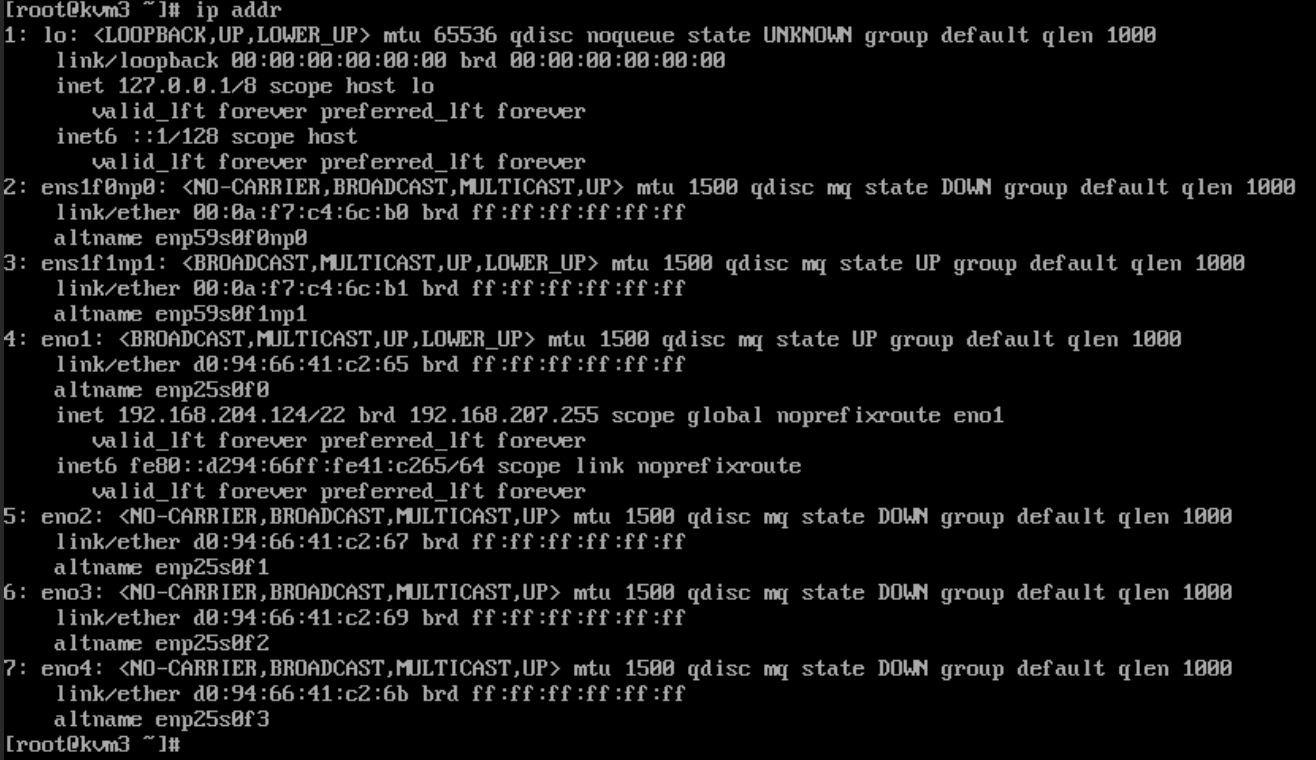
Here we can see the NICs with the longer names, ens1f0np0 and ens1f01p1. This is 10 characters long!
To rename the NICs take note of the MAC address for each port. We will need that to link to a new name.
First let’s create a directory /etc/systemd/network.
mkdir -p /etc/systemsd/network
Next, we will need to create a .link file for each interface in this directory. In the context of Linux networking, a “.link” file refers to a network link configuration file used by systemd-networkd to define the properties of a network device. These files are distinct from the symbolic or hard links used for file system management with the ln comnand.
Specifically, a .link file describes attributes of a network interface, such as:
- MAC address: Setting a specific hardware address for the interface.
- NamePolicy: Defining how the network interface should be named
- AlternativeNames: Providing alternative names for the interface.
- Driver: Specifying the network driver to be used.
- MTU (Maximum Transmission Unit): Setting the maximum size of packets that can be transmitted over the link.
These .link files are usually located in /etc/systemd/network/ and are read by systemd-networkd when it initializes network devices. They provide a declarative way to configure network interface settings at a low level, ensuring consistent and predictable behavior for network devices.
For the example we will make the file 10-net01.link. In the file we will use the [Match] section to identify the MACAddress of the NIC.
Then in the [Link] section we will rename it using the Name directive
The final file should look similar to this;

You will need a file for each NIC you want to rename.
Next up, the OS likely already initialized the interface, This would be in the /etc/sysconfig/network-scripts directory using the format ifcfg-NIC_NAME.
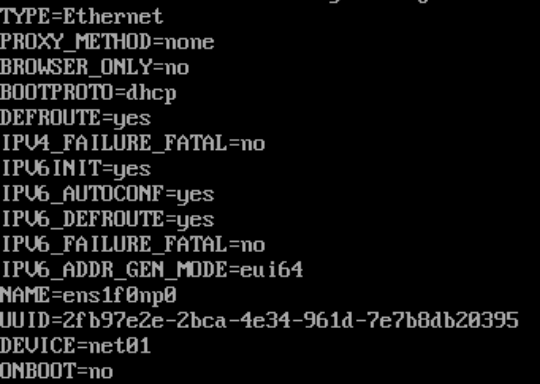
You have two choices, rename the file to match the new name or keep the original file name so you know the original name. Regardless, you do need edit the file, and update the DEVICE= to show the new name. If this example it looks like this;
That’s it! Reboot the server and you should see the new name.
